
Free Invoice App for Contractors
Invoice from your phone, accept card payments with zero platform fees, and stop chasing payment. Built for contractors — free forever.
Setup in 2 minutes · No credit card · Cancel anytime
“I used to wait 45 days to get paid. Now I send a payment link with the final invoice and it's usually cleared within 24 hours.”
Dave K.
Owner · Kugler Construction
The invoicing problems every contractor knows
TX2Pay is built to solve exactly these.
Large projects that need deposit and final invoices
Contractor projects often require an upfront deposit, progress billings, and a final invoice. TX2Pay handles multi-stage invoicing with no extra software needed.
Clients who delay payment after project completion
The job is done but payment takes weeks. TX2Pay's online payment link gets you paid the day you send the final invoice — not 30 days later.
Written estimates that don't convert to contracts
A verbal estimate is not a contract. TX2Pay's proposals give clients a professional document to review, approve online, and sign off on — before you start work.
Invoice from your phone in under 30 seconds
Open TX2Pay the moment the job is done. Add your line items, hit send. Your customer gets a professional invoice with a card payment link — before you leave the driveway.
Open TX2Pay — select your client
Add your services and price
Send — they pay by card on the spot
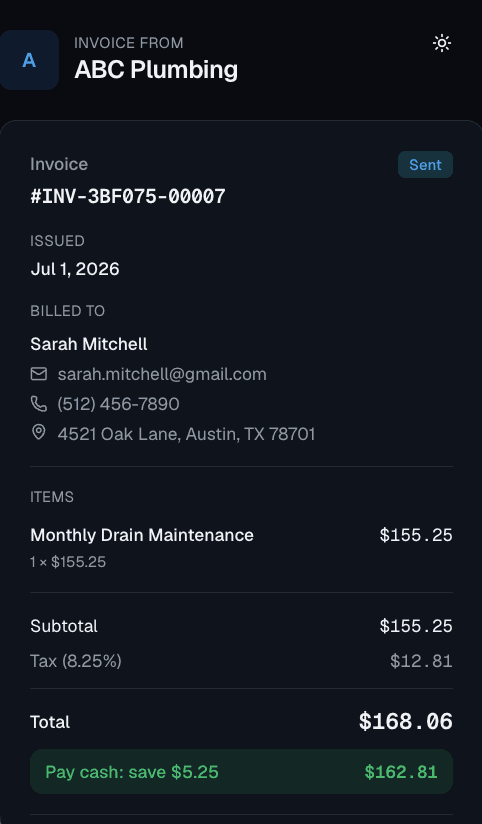
Customer pays by card — you get notified instantly
No credit card · Free forever
How TX2Pay works for contractors
Deposit and progress invoices
Send an initial deposit invoice to get the project started, then bill for milestones or send the final balance invoice on completion — all tracked in one place.
Proposals clients can approve online
Build a detailed project estimate and send it as a professional proposal. Clients review and approve online — no PDFs, no back-and-forth email chains.
Convert proposals to invoices instantly
Once the client approves your estimate, convert it to an invoice in one click. All the line items, pricing, and client info carry over automatically.
Everything included, completely free
No trial period. No credit card. Free forever.
Questions from contractors
Can I send a deposit invoice and then a final invoice for the same project?
Yes. TX2Pay lets you create multiple invoices per client. You can send a deposit invoice, track when it's paid, then send the final balance invoice at project completion.
Can I use TX2Pay for large commercial contracts?
Yes. TX2Pay works for any project size — from small handyman jobs to large commercial builds. Invoices support any number of line items.
Can clients sign a proposal electronically?
Clients can approve proposals online through TX2Pay's approval flow.
Is TX2Pay free for contractors?
Yes. The free plan includes unlimited invoices, proposals, and online payment acceptance.
Start invoicing like a pro — free
Join hundreds of contractors already using TX2Pay. No credit card required. Set up in 5 minutes.
Create Your Account